A fifty-five-slide deck that turns the foundations of agentic software
engineering into something you can read in one sitting — the discipline,
Claude Code, reusable skills, and the systems knowledge behind tokens
and caching. Use the arrow keys, the on-screen controls, or the Present
button to step through.
Slides01 / 55
Course 1
Agentic Software Engineering: Foundations
Speed without discipline is not engineering.
A practical foundation for working with AI coding agents — the engineering discipline, Claude Code, reusable skills, and the systems knowledge behind tokens and caching.
Foyzul Karim · linkedin.com/in/foyzulv1.0
The Hook02
Speed without discipline is not engineering.
AI coding agents make development 10× faster. Without process, that speed produces broken code, lost context, and runaway cost.
01
The Paradigm Shift
From “type the code” to “direct the work.”
AI writes; engineers design, review, and own.
Output scales; judgment still doesn’t.
Agents are teammates, not tools.
02
Quality at Risk
Speed amplifies mistakes, not just output.
Without tests, every change is a coin flip.
Without review, bugs ship to production.
Without process, speed kills quality.
03
Cost Escalation
Long sessions re-bill the same context every turn.
No caching → tokens compound.
Cheap prompts become expensive at scale.
Without hygiene, costs spiral.
→This course gives you the framework, skills, and systems knowledge to turn raw speed into disciplined engineering.
Foundations03
Your Foundation for Agentic Engineering
Four modules move from the discipline to the machinery — so you can use coding agents deliberately, not by instinct.
1
Why Discipline Matters
Agents, LLMs, vibe coding, and the 5-phase framework.
2
Claude Code
The CLI, its configuration surface, and the files it manages.
3
Skills
Reusable workflows, precise invocation, and token-aware automation.
4
Under the Hood
Tokens, context, inference, KV cache, prompt caching, and working habits.
→Understand the process. Learn the interface. Open the machine. Then work with intention.
The Hook04
Why This Course Exists
Problem “Vibe coding” — asking AI to write code without process — produces unmaintainable, untested code that breaks in production.
Four Pillars — What Makes This Course Different
01
5-Phase Framework
Process creates reproducibility. Reproducibility creates trust.
02
Extension Architecture
Skills + Hooks + MCP extend Claude’s capabilities to your stack.
03
Live Demonstrations
Theory without practice is entertainment, not education.
04
Hands-On Learning
You build alongside. Every phase, every skill, every decision.
→Process beats prompts. The 5-phase framework turns “vibe coding” into engineering.
The Hook05
Who This Course Is For
Software Engineers
Team Leads
Senior Developers
Architects & Leads
Add agentic workflows to your daily practice.
Roll out Claude Code safely across your team.
Tune skills, hooks, and the CLI to your stack.
Decide where agents belong — and where they don’t.
Prerequisites Terminal familiarity · Git · One programming language
→No matter your role, agentic engineering needs process + tools + practice.
The Hook06
What Is an Agent?
Problem One-shot prompts fail on complex tasks. Every LLM call has limited context, no planning, and no verification.
Concept An Agent is an intelligent orchestrator that decomposes work and decides what to do next.
Agent
decomposes · decides · verifies
⇣
Sequential Skills
Ordered, predictable workflows.
⇉
Parallel Subagents
Fast, scalable execution.
→Agents decompose work into sequential skills or parallel subagents. The fundamental building block.
The Hook07
What Is a Large Language Model?
Definition
A statistical model trained on text to predict the next token. No memory, no awareness — just pattern matching at scale.
The Breakthrough
The transformer: parallel attention over the whole context at once. Long-range coherence at scale — the architecture that made agents possible.
The Four Pillars
01
Pre-training
Trained on billions of documents
Absorbs patterns by exposure
Predicts patterns, not meaning
02
Next-Token Prediction
Predicts the next likely token
Adds it back, repeats
Simple mechanism, intelligent output
03
Emergent Capabilities
Small: completes sentences
Medium: summarizes paragraphs
Large: writes code, debugs, reasons
04
Transformer Arch
Looks at all words at once
Decides which parts matter
Long-range coherence
!Hard limits: finite context window (~200K tokens) · no persistent memory across sessions · KV-cache is working memory, not true memory.
The Hook08
How LLMs Power Agents
The LLM is the brain. The agent is the body.
01
Intent
You state what you want in natural language. The LLM parses words into a structured goal.
LLM parses → structured goal
02
Breakdown
The LLM decomposes the goal into steps. Route → schema → validation → query → errors.
LLM plans → executable steps
03
Execution
The LLM generates the actual code — functions, SQL migrations, test cases.
LLM builds → working code
04
Loopback
The LLM evaluates the result. Tests pass? Secure? Generates fix if needed.
LLM checks → adapts → repeats
Also known as: perceive-plan-act-observe · ReAct · OODA — same pattern, different names.
→The quality of the loop is determined by the quality of the intent. Vague prompts → vague breakdown → vague code. The framework gives you structure. Specificity gives you precision.
The Hook09
The Agent as Orchestrator
From single-intent assistants to purpose-based orchestrators that coordinate parallel subagents.
Sequential Skills
1 · REQRequirements
2 · ARCHArchitecture
3 · TASKSTask Generation
4 · TDDTDD Implementation
5 · REVIEWReview & Merge
Ordered workflows — one step feeds the next.
Parallel Subagents
Subagent 1 Database schema design
Subagent 2 API parser logic
Subagent 3 Error handling layer
Subagent 4 Test suite generation
Orchestrator coordinates · integrates · verifies.
→Scales with the problem: small task → 1 subagent · complex system → 10 subagents, coordinated, verified.
The Hook10
The Problem With “Vibe Coding”
The cycle
Prompt → Code → Hope → Ship →Bug→ Repeat
Five Problems
01
No Requirements
”Build a dashboard” — but which metrics? Which users? You operate on assumptions.
02
No Architecture
Agent writes file by file with no blueprint. Every PR is a breaking change waiting to happen.
03
No Task Breakdown
”Build the backend” is not a task. It is a wish.
04
No Tests
Without tests, quality is unknown. Manual verification is a prayer, not a strategy.
05
No Review
Bugs and security flaws go straight into your codebase.
→Vibe coding produces toys. The 5-phase framework turns speed into engineering.
The Hook11
The 5-Phase Agentic Framework
Each phase has one owner and produces one deliverable. No phase is optional.
#
Phase
Owner
Deliverable
1
Requirement Engineering
You
REQ document — what to build
2
System Architecture
You + Claude
ARCH doc — data models, APIs, modules
3
Task Generation
Claude
Task list with tests + scope + REQ trace
4
TDD Implementation
Claude
Working code + passing tests
5
Review & Merge
You + Claude
Approved PR — 16 parallel checks
→Each phase has one owner and one deliverable. Discipline over speed.
The Hook12
Three Scenarios, One Framework
The same 5-phase pipeline — different entry points. The discipline never changes.
1 · REQRequirements
→
2 · ARCHArchitecture
→
3 · TASKSTask Generation
→
4 · TDDTDD Implementation
→
5 · REVIEWReview & Merge
Scenario
REQ
ARCH
TASKS
TDD
REVIEW
Note
Greenfield
1
2
3
4
5
Blank slate — all 5 phases.
New Feature
—
2
3
4
5
System exists — skip REQ.
Bugfix
RCA
—
3
4
5
Root-cause analysis first — understand why.
→The entry point changes. The discipline doesn’t. Same framework, different starting line.
Reflection13
Reflection
What Did We Learn?
One-shot prompts fail — complex work needs agents.
”Vibe coding” skips steps — 5 phases give AI a process.
The framework adapts — mindset never changes, every skip needs a reason.
→Process beats prompts. Next: the tools that make this process executable.
Intro to Claude Code CLI · The CLI14
Claude Code: Your Agentic CLI
Problem The 5-phase framework needs a tool — one that reads codebases, runs tests, and loads skills.
Concept Claude Code is Anthropic’s official CLI — your terminal interface to agentic engineering.
01
Reads Full Codebase
Analyzes architecture, dependencies, and conventions across your entire project.
02
Edits, Tests & Shell
Writes code, runs tests, executes bash — all within your existing workflow.
03
Skills via /commands
Type /req, /arch, /tdd — Claude loads your skill and follows your process.
04
MCP Integration
Connects to Playwright, databases, search — giving Claude eyes, arms, and memory.
Specialized subagents with focused tool sets. Invoked automatically when task matches description.
→Global: ~/.claude/settings.json + ~/.claude/CLAUDE.md. Project wins. No magic.
Intro to Claude Code CLI · Demo · 1 of 415a
A Real ~/.claude/ — Config, Skills & Agents
Demo What actually lives in your global config directory — the pieces you configure and invoke directly.
~/.claude/ (this machine)
~/.claude/
│
├── CLAUDE.md← global rules — every session
├── settings.json← global config & permissions
│
├── agents/← subagent definitions
├── skills/← skill definitions
└── plugins/← installed packages
Core Config
CLAUDE.md — global instructions loaded into every session. Your coding standards, response format, workflow rules — applies before any project-level rules. settings.json — default model, permission allowlists, trusted tools, env vars. Overridden by project-level settings.json.
Skills & Agents
skills/ — global slash-command definitions. Available in every project, every session. agents/ — subagent specs with a description, focused tool set, and own instructions. Claude picks the right one automatically. plugins/ — installed skill packages. The dev-pipeline plugin lives here.
→These are the pieces you actively write and configure. Memory, history, and cost tracking — next slide.
Intro to Claude Code CLI · Demo · 2 of 415b
A Real ~/.claude/ — Memory, History & More
Demo Directories Claude manages itself — memory, audit trails, costs, and custom providers.
~/.claude/ (continued)
├── agent-memory/← Claude’s persistent memory
├── file-history/← per-file edit log (69 files)
├── projects/← per-project stored state
│
├── plans/tasks/jobs/← work tracking artifacts
├── sessions/transcripts/← 84 conversation logs
│
├── history.jsonl← every command ever run
├── cost-log.jsonl← token & cost per session
│
├── kimi.jsonglm.json← cloud LLM providers
└── ollama.jsonomlx.json← local model providers
Memory & State
agent-memory/ — Claude’s persistent learnings, written and read across sessions. file-history/ — 69 files tracked across all sessions. Claude knows what changed and when. projects/ — per-project state: tasks, plans, stored context.
Audit & Cost
history.jsonl — every Bash command Claude ever ran. Full audit trail. cost-log.jsonl — token spend per session, automatically tracked. transcripts/ — 84 full conversation logs. Every decision, recoverable.
Custom LLM Providers
kimi.json, glm.json, minimax.json — cloud provider configs. ollama.json, omlx.json, lmstudio.json — local model configs. Claude Code is not locked to Anthropic — route to any compatible model.
→Let’s open this live — switch to terminal and walk through each directory.
Intro to Claude Code CLI · Demo · 3 of 415c
How ~/.claude/projects/ Works
Demo Every project you’ve ever worked on gets its own directory — named after the path on your machine.
Project path → directory slug. Forward slashes become hyphens. /Users/your-name/projects/my-app → -Users-your-name-projects-my-app/ One directory per unique path — worktrees get their own entry too.
Session Logs
Each UUID .jsonl file is one conversation session — start to finish. This project has 18 sessions logged. Full history: every message, every tool call, every file edit.
Project Memory
The memory/ subdirectory holds Claude’s project-specific learnings — separate from the global agent-memory/. What Claude remembers about this codebase lives here.
→Let’s open this live — switch to terminal and walk through the project directory.
Intro to Claude Code CLI · Demo · 4 of 415d
The Root ~/.claude.json
Demo Claude Code’s global runtime state — usage history, per-project snapshots, and last-session metrics.
numStartups: 485 — Claude Code launched 485 times on this machine. customApiKeyResponses — which providers you approved (lmstudio) or rejected (ollama). tipsHistory — every onboarding tip Claude has shown you, tracked so it doesn’t repeat.
Per-Project Entry
Keyed by project path — 45 projects tracked. Each stores: allowed tools, MCP server config, representative exampleFiles Claude picked from your repo, and a full snapshot of the last session.
Last Session Snapshot
lastCost: $0.83 — cost of the previous session. cacheReadTokens: 1,516,400 vs cacheCreation: 38,994 — cache doing its job. lastModelUsage — both Haiku and Sonnet used; Haiku for lightweight calls.
→Not a config file — a runtime ledger. Claude writes it, you read it to understand what’s happening.
Intro to Claude Code CLI · Dashboard15e
The Status Line — Your Live Dashboard
Concept Every number visible the moment Claude Code opens — and every one of them is customizable.
[Sonnet 4.6]🗂agentic-swe-vod|🌿 main145790 tokens
████72%|$3.93|⏱ 136m 4s|🕐 06:58|1m20s idle
cache: 99%|read: 144k|write: 0k|+623-107
►► accept edits on (shift+tab to cycle)
Session Identity
Sonnet 4.6 — active model. agentic-swe-vod — project. main — git branch.
Cost & Context
72% — context window used. $3.93 — session cost so far. 145790 tokens — total this session.
Cache Health
cache: 99% — hit rate. read: 144k — tokens served from cache. write: 0k — new cache created.
Permission Mode
accept edits on — Claude edits freely. shift+tab cycles: plan → default → accept edits. +623 -107 — lines changed.
→Customize with /config or the statusline-setup skill. Change what’s shown, reorder, toggle off.
Skills Intro · Concept16
Skills: Automate Your Workflows
Problem Every session starts from zero. You re-explain conventions — every single time.
Solution Skills = markdown in .claude/skills/, loaded on demand via slash command.
01
You type /command
/req /arch /tdd /review
Signal: switch to this workflow.
02
Claude loads skill
.claude/skills/req/SKILL.md
Process, checklists, output format.
03
Claude follows it
Socratic → ARCH → Tasks → TDD → Review
Consistent. Repeatable. Every time.
Dual-invocation
User slash command or Claude auto-matches. Three modes: default · user-only · Claude-only.
On-demand
Zero context bloat until needed.
Version-controlled
In .claude/skills/ — shared, committed.
Skills are matched by LLM reasoning over the description field — not keyword matching. Write descriptions that articulate when to use the skill, not just what it does.
Invocation control: Default (no flags) → both user & Claude. disable-model-invocation: true → user slash command only. user-invocable: false → Claude auto-invoke only (no slash command — for background knowledge skills).
→A skill is a contract. Define once. Claude executes every time.
Skills Intro · Ecosystem16a
Dissecting a Skill
Skills aren’t only files you write — they ship with the CLI, arrive via plugins, or live in your repo. Same anatomy, three sources.
Claude matched “initialize the claude” → description: “Initialize a new CLAUDE.md…” via LLM semantic match — no keyword.
→Skills are triggered by intent, not syntax. /init and “can you initialize claude?” reach the same skill.
Skills Intro · Agents16b
Built-in Agents: Explore Before You Build
Two read-only agents shipped inside Claude Code — and the targets your skills can delegate to via context: fork.
Explore Agent
Tools: Read, Bash, Grep, Glob + search — no Edit, Write, or file-modifying tools.
Use for: Understanding an unfamiliar codebase before proposing changes.
How to invoke: Ask Claude to explore before architecting, or use the Agent tool with subagent_type=“Explore”.
When: Before writing an architecture document. Before touching legacy code.
Plan Agent
Tools: Read, Grep, Glob, WebSearch — no Edit, Write, or shell execution.
Use for: Designing implementation plans grounded in the actual codebase.
How to invoke: Use the Agent tool with subagent_type=“Plan”, or ask Claude to plan before implementing.
When: Before implementing a complex feature. Before a refactor.
Both agents are read-only by definition — they literally cannot write files. Safe to run on unfamiliar codebases before you understand them.
→The best architecture is grounded architecture. Explore before you plan. Plan before you code.
Skills Intro · Demo16c
Demo: Automation Recommender
A read-only skill that analyzes your codebase and surfaces the top 1–2 automations across all five extension points — with why, not just what.
Invoke
/claude-automation-recommender
or ask: “what automations can I set up for this project?“
5 Automation Types It Covers
Hooks
Auto-actions on tool events — format, lint, block edits
Subagents
Specialized reviewers that run in parallel
Skills
Packaged workflows, invoked by user or Claude
Plugins
Collections of skills, installed once
MCP Servers
External integrations — DB, APIs, browser, docs
Phase 1 — Codebase Analysis
Reads package.json, pyproject.toml, .claude/, project structure. Detects language, framework, DB, CI/CD, external APIs — each signal maps to a specific recommendation.
Phase 2 — Generate Recommendations
Recommends 1–2 per category max. Skips irrelevant categories entirely. Goes beyond reference lists — uses web search for framework-specific options.
Phase 3 — Output Report
Each recommendation includes Why (codebase-specific reason), Install/Create command, and invocation mode. Ends with: “ask for more on any category.”
→Read-only by design — analyzes and recommends. You decide what to implement. Now let’s open the SKILL.md and see how this is built.
Skills Intro · Hands-on17
Demo: Recommendation → Skill → Output
The recommender suggested a release-notes skill for claude-lens. We built it on the spot and ran it — here’s what happened.
Recommender Output — Skills section
release-notes(custom, user-only) Why: Project is at v1.1.0, distributed via npx github:foyzulkarim/claude-lens. A skill that drafts a changelog from git log since the last tag saves time before each version bump.
{inner}
Starter template — rough shape, needs real steps.
.claude/skills/release-notes/SKILL.md — built on the spot
{inner}
Invoked with /release-notes → real CHANGELOG entry written.
→The recommender gives you the shape. You add the steps. /release-notes ran and prepended a real entry to CHANGELOG.md — zero manual drafting.
Skills Intro · Cost18
Demo: Let Bash Do the Work
Three versions of the same commit skill — each one moves more work out of the LLM and into bash. The tokens follow.
commit (v1) — LLM does everything
Claude runs each git command itself: git status git diff —stat git diff —cached
Asks: “what to stage?”
Asks: “commit this?”
Multi-turn, interactive.
Many tool calls · back-and-forth · high tokens
commit-v2 — bash collects, LLM drafts
Exactly 3 tool calls:
{inner}
Zero confirmation. No back-and-forth. Sensitive files auto-excluded by script.
3 tool calls · same diff volume, less round-trips
commit-v3 — adaptive bash, LLM hits once
Same 3 tool calls — but gather.sh is now adaptive:
{inner}
Context curation happens in bash — no LLM involvement. “Emit no narration between the three tool calls.”
→The LLM should read context, not gather it. Move collection to bash — one script, one call, one read. The skill stays thin; the savings stack.
Skills Intro · Power18a
Dynamic Context Injection
Prefix a line with ! — the command runs before Claude reads the skill; its output replaces the line. Cheap, fast, live state.
{inner}
→Skills read live state, not stale docs. The injection runs at load time, every time.
Skills Intro · Anatomy19
Skill Frontmatter — The Top of the File
Every skill is a markdown file. The YAML between the --- markers configures how it loads, what tools it can call, and when Claude can auto-invoke it.
Core
name
slash command identifier
description
LLM-matched trigger — “Use when…”
Invocation
disable-model-invocation
user slash command only
user-invocable
false = Claude auto-invoke only
Tools & Model
allowed-tools
tools Claude can call here
model · effort
override defaults per skill
context: fork
run in isolated subagent
Side Effects
hooks
Pre/PostToolUse while skill is active
disallowed-tools
block tools while skill is active
→Frontmatter is policy. Decide intent and permission once — the skill enforces it every time.
Skills Intro · Anatomy19a
Skill Frontmatter — Beyond the Basics
The fields that handle the long tail: arguments, paths, lifecycle, sharing, and control. Most skills use only a subset — pick what your workflow actually needs.
More Frontmatter Fields
when_to_use
extra trigger phrases for LLM matching
argument-hint
autocomplete hint for expected args
hooks
PreToolUse · PostToolUse hooks while skill is active
model · effort
override model or thinking level per skill
disallowed-tools
block tools while skill is active
Arguments & Substitutions
$ARGUMENTS · $0 · $1
positional args passed at invocation
arguments:
named args — $issue, $branch, etc.
CLAUDE_SKILL_DIR
skill-relative path for bundled scripts
CLAUDE_SESSION_ID
session ID for logging or correlation
CLAUDE_EFFORT
adapt instructions to active effort level
Skill Directory & Lifecycle
supporting files
templates, examples, scripts alongside SKILL.md
live change detection
edits take effect without restarting
auto-discovery
parent + nested dirs — monorepo-friendly
skill content lifecycle
compaction budget — 5k tokens/skill, 25k total
Sharing, Control & Extras
skillOverrides
on · name-only · user-invocable-only · off
Skill(name) permission rule
allow/deny specific skills in /permissions
/run · /verify
bundled skills — launch & confirm against live app
/run-skill-generator
record your project’s launch recipe once
/doctor
diagnose skill listing budget overflow
→Official docs: Claude Code → Skills. Every keyword above has its own section. That’s the full toolkit — next, we open the hood and see the machine underneath.
· · · Under the Hood
Under the Hood.
You’ve seen what to build — skills, the .claude directory, the workflow. Before we build, we open the machine. Tokens, the context window, the request loop, and caching — the four things that explain why agents forget, why long sessions get expensive, and why structure beats memory. After this, nothing in the build is magic.
Under the Hood · The Unit21A
What Is a Token?
Before the model reads anything, your text is chopped into tokens. The model never sees letters or words — only tokens.
01
Not letters, not words
Sub-word chunks. A common word like “the” is one token; a rare word splits into several. ~3–4 characters per token in English.
02
Everything is tokens
Your prompt, your code, file contents, tool definitions, and the model’s output — all measured and billed in tokens.
03
Bengali costs more
Bengali and other Unicode scripts tokenize heavier: more tokens per character than English. Same meaning, bigger token count.
04
Next-token prediction
The model predicts the next token from patterns, appends it, repeats. Pattern matching — not meaning, not understanding.
→Tokens are the unit of everything ahead — context size, speed, and cost are all counted in tokens.
Under the Hood · The Container21B
What’s in the Context Window
The context window is the model’s working memory for one request — finite, about 200K tokens for Sonnet. And most of it is loaded before you type a single word.
Token budget — one request
System promptMachinery
Your instructions to Claude — loaded every turn
Tool definitionsMachinery
Every tool schema Claude can call
CLAUDE.mdMachinery
Project rules — present every request
Skills metadataMachinery
Loaded skill descriptions and signatures
Files read inSession
Code, docs, tool outputs read this session
Conversation so farSession
All prior turns this session
← your new messageYou
Before you type
The gold rows — system prompt, tools, CLAUDE.md, skills — are already there. You pay for them on every request, even if you didn’t write them this turn.
The limit
~200K tokens total. Every token competes for the same finite budget. When it fills, earliest messages drop first.
→Every token competes for the same finite budget — and you pay for all of it, every turn.
Under the Hood · Statelessness21C
The Server Remembers Nothing
Every message, Claude Code packages the entire context into one payload and ships it. The server holds nothing between calls. The model is a pure function of the text you send.
✗ What people imagine
A server that remembers your conversation — you send a new message, it picks up where it left off. Context persists on the server between calls.
The server stores your session state.
✓ What actually happens
The whole context is re-assembled and re-sent on every call. No conversation state is stored server-side — every call starts fresh. (A short-lived cache may speed up re-processing, but it isn’t memory — more on that later.)
The server is stateless. Every call starts fresh.
Session= the running context, held by Claude Code on your machine — not on the server.
→The ‘conversation’ lives in your terminal, not in the model.
Under the Hood · Multi-Turn21D
The Loop: How Tools Run
The model can’t run anything. It returns text, or a request to use a tool. Claude Code runs the tool, appends the result, and sends the whole thing back. Repeat.
1You send a goal
→
2Tool-use request
→
3Claude Code runs it
→
4Result appended
→
5Whole context re-sent
→
6Loop until done
Key terms
Append = added to the end of the context. The tool result joins the conversation and grows the window.
Multi-turn = one goal, many round-trips. What looks like one answer may be six turns under the hood.
Why this matters
Each tool call adds to the context. After ten calls, you’ve sent the original prompt ten times plus ten growing result payloads. The context window fills faster than it looks from outside.
→One thing you ask for can be ten turns under the hood — and the context grows with every one.
Under the Hood · The Problem21E
Why Sessions Get Expensive
Problem Every turn re-sends a growing context. You pay input tokens for the whole window — again and again. Twenty turns deep, you’re re-billing the same 50K tokens twenty times.
Token cost grows with turns
Turn 1
~5K tokens
Turn 5
~25K tokens
Turn 10
~50K tokens
Turn 20
~100K+ tokens
The expensive part
The front of the context — system prompt, tools, CLAUDE.md, early turns — barely changes. Yet it’s re-sent and re-computed from scratch by the model — every single turn.
Re-sending 50K tokens of stable context 20 times = billing for 1M tokens you’ve already paid for.
→Re-sending the stable part every turn means re-computing it every turn. To see where the cost actually lives, we need to open up what “computation” means.
Under the Hood · Inside One Turn21E1
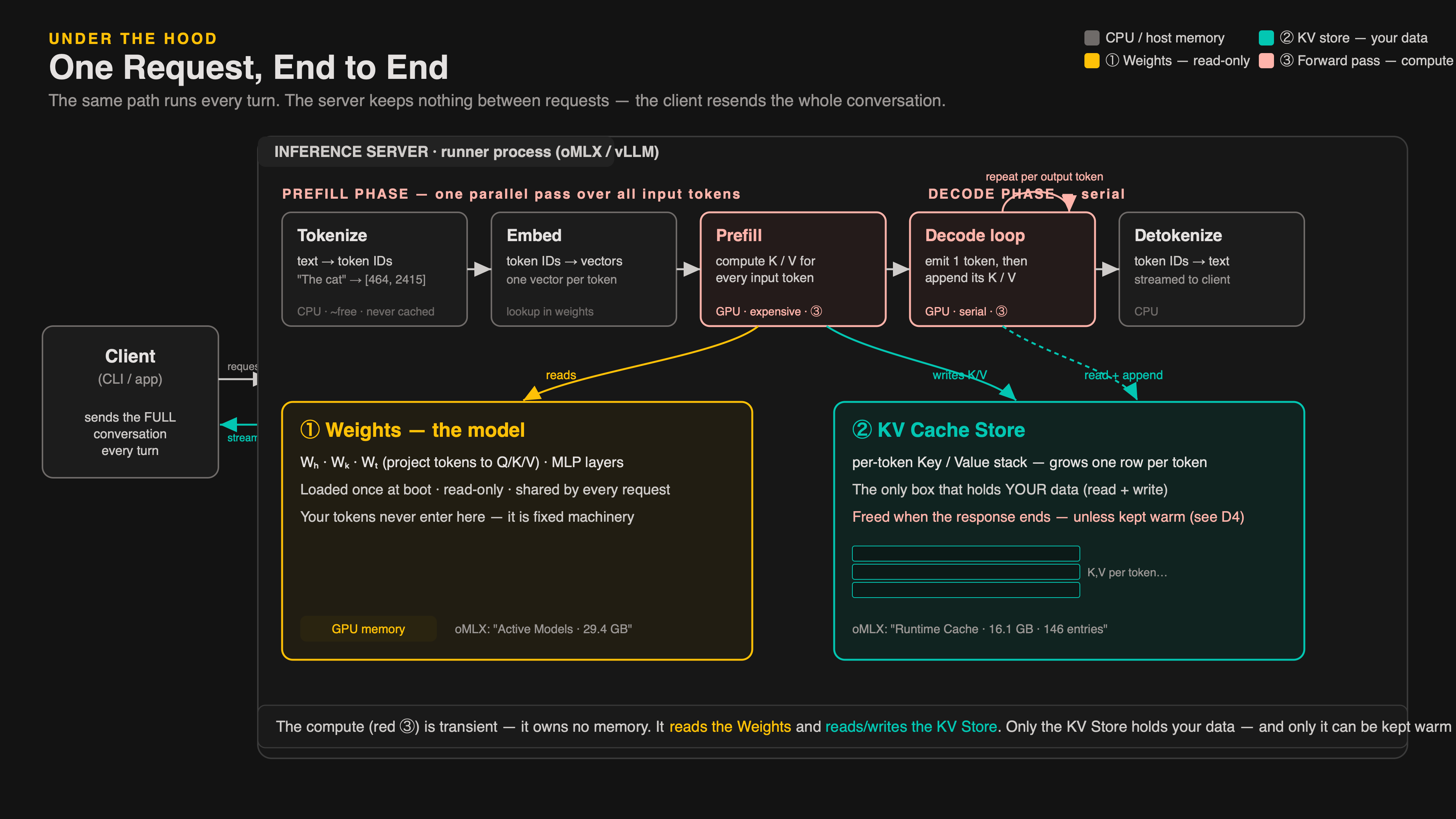
Why It’s Expensive: Tokenize, Prefill, Decode
When you hit Enter, the server doesn’t just “read and reply.” Three stages run in sequence — and the middle one is where almost all the cost lives.
Stage ① · Tokenize
#
Your entire input — system prompt, tools, CLAUDE.md, conversation, your message — is chopped into token IDs (21A).
Always runs · ~free · CPU
Stage ② · Prefill
∑
All input tokens are ingested in one parallel pass, and for each the model computes a key and a value through attention — the mechanism by which tokens weigh relationships with all other tokens. How the model “understands” context.
Expensive · proportional to input size · the GPU burns most of its time here
Stage ③ · Decode (Generate)
↻
The model produces output tokens one at a time. Each depends on all previous tokens. Serial, sequential.
Output cost · one word at a time
Tokenize is ~free · Prefill = input cost · Decode = output cost. You pay for both, every turn. And the stable prefix — the unchanging front of the context — goes through prefill again and again, even though it hasn’t changed.
→The expensive part isn’t the reply — it’s re-prefilling your entire context from scratch every turn.
Under the Hood · Live Demo21E2
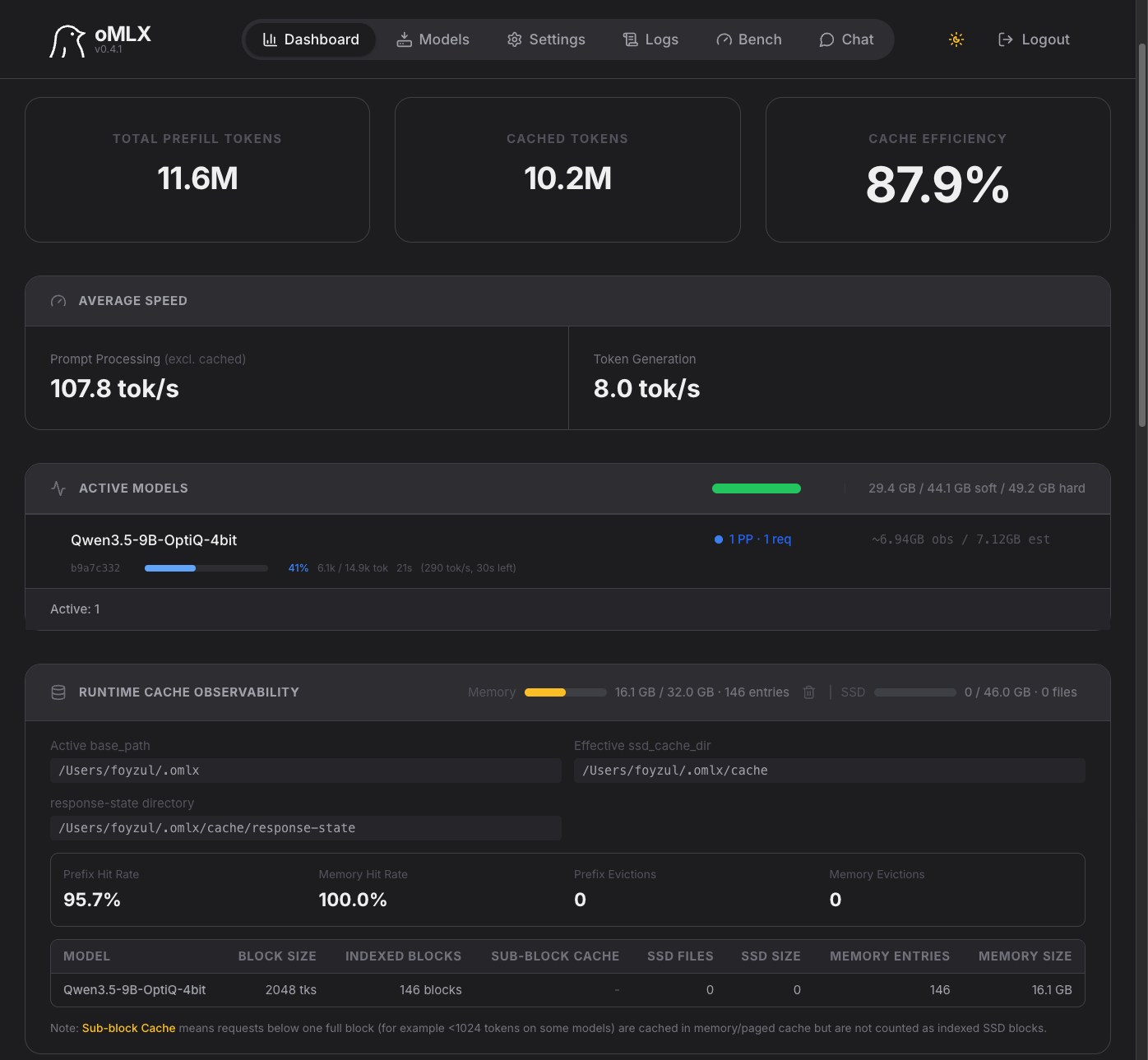
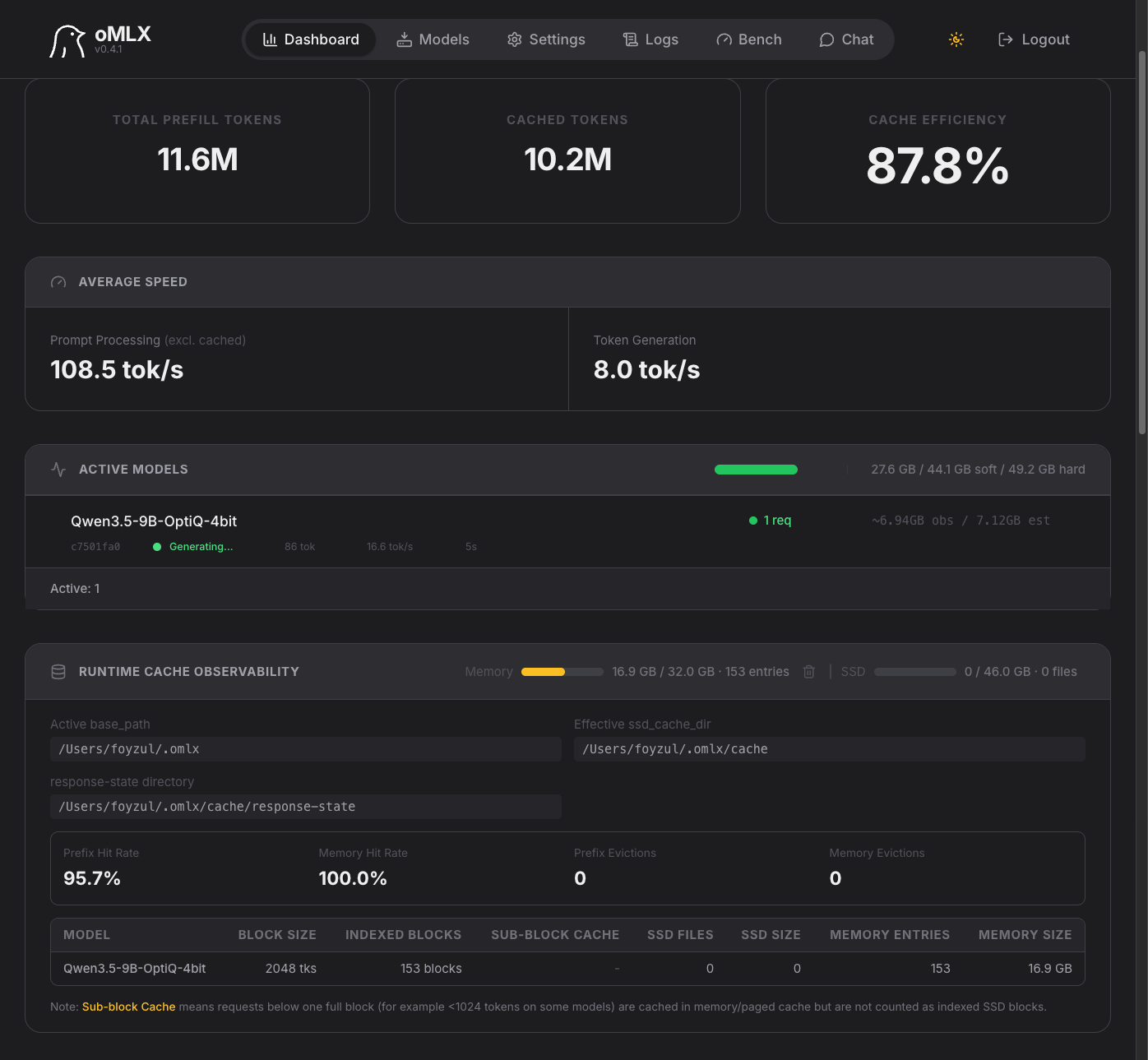
Live: Prefill vs. Decode
Same machine — a Mac Mini M4 Pro running a local LLM via oMLX. Two screenshots, seconds apart. First the prefill pipeline ingests the prompt. Then generation begins.
Stage ② · Prefill
1 PP (1 req in prefill) · 14.9K-token prompt ingested at 107.8 tok/s
Stage ③ · Decode (Generate)
Generating… · emitting tokens at 16.0 tok/s · cache meter visible top-right
→Prefill is parallel bulk ingestion. Decode is serial token-by-token emission. The same context that took seconds to ingest now streams out one word at a time.
Under the Hood · The First Fix21F
KV Cache: Compute Once, Reuse
Solution 1 To emit each new token, attention must look at the Key and Value of every earlier token. So compute each token’s K/V once, store them, and reuse — instead of re-deriving the whole history at every step.
Attention = a soft dictionary lookup
Query (Q)
What the current token is looking for. Used once, then dropped — never stored.
Key (K)
The label a token advertises — what every later Query matches against.
Value (V)
The content a token hands over when its Key gets matched.
During Prefill
Compute K and V for all input tokens in one parallel pass, and write them to the store. One-time cost.
All input tokens → K/V → stored
During Decode
Each new token’s Query reads the whole stored K/V, emits a token, then appends its own K/V. One new row per step.
Read store → emit → append → repeat
Think of a game checkpoint — instead of replaying from level 1 each time you want to advance one step, you save progress and resume from there. Without the KV store, every decode step would re-derive K/V for all prior tokens — quadratic. The store is that checkpoint: each token’s K/V computed once, reused forever after. But the checkpoint is ephemeral — it is wiped when the response ends, so the next turn must re-prefill the stable prefix from scratch.
→Compute once, reuse — within one response. Next: inside the lookup itself, to see how attention actually reads these K/V rows — then where this store lives, and why it dies when the response ends.
Under the Hood · How Attention Picks21F2
Inside the Lookup: How Attention Picks
Previously we called attention a soft dictionary lookup. Here’s the actual mechanic — three steps that turn the current token’s Query into one blended answer. Worked on a real sentence.
”The cat sat on the mat because it was tired.” — processing “it”, whose Query asks: which earlier token do I refer to? It compares against every earlier token’s Key.
Step 1 · Dot-product
Multiply “it“‘s Query by each Key → one relevance score per token. Bigger = better match.
cat 9.1 mat 4.0 sat 0.3 the 0.1
Step 2 · Softmax
Squash the scores into percentages that sum to 100% — the attention weights.
cat 85% mat 10% sat 3% the 2%
Step 3 · Weighted blend
Add up each token’s Value times its weight. The result is one vector — mostly cat’s content.
→It never returns one entry — it returns a blend of all Values, weighted by relevance. That’s the “soft.” And it reads every stored Key/Value to do it — which is why the whole history must stay in the KV store.
Under the Hood · The Boxes21G
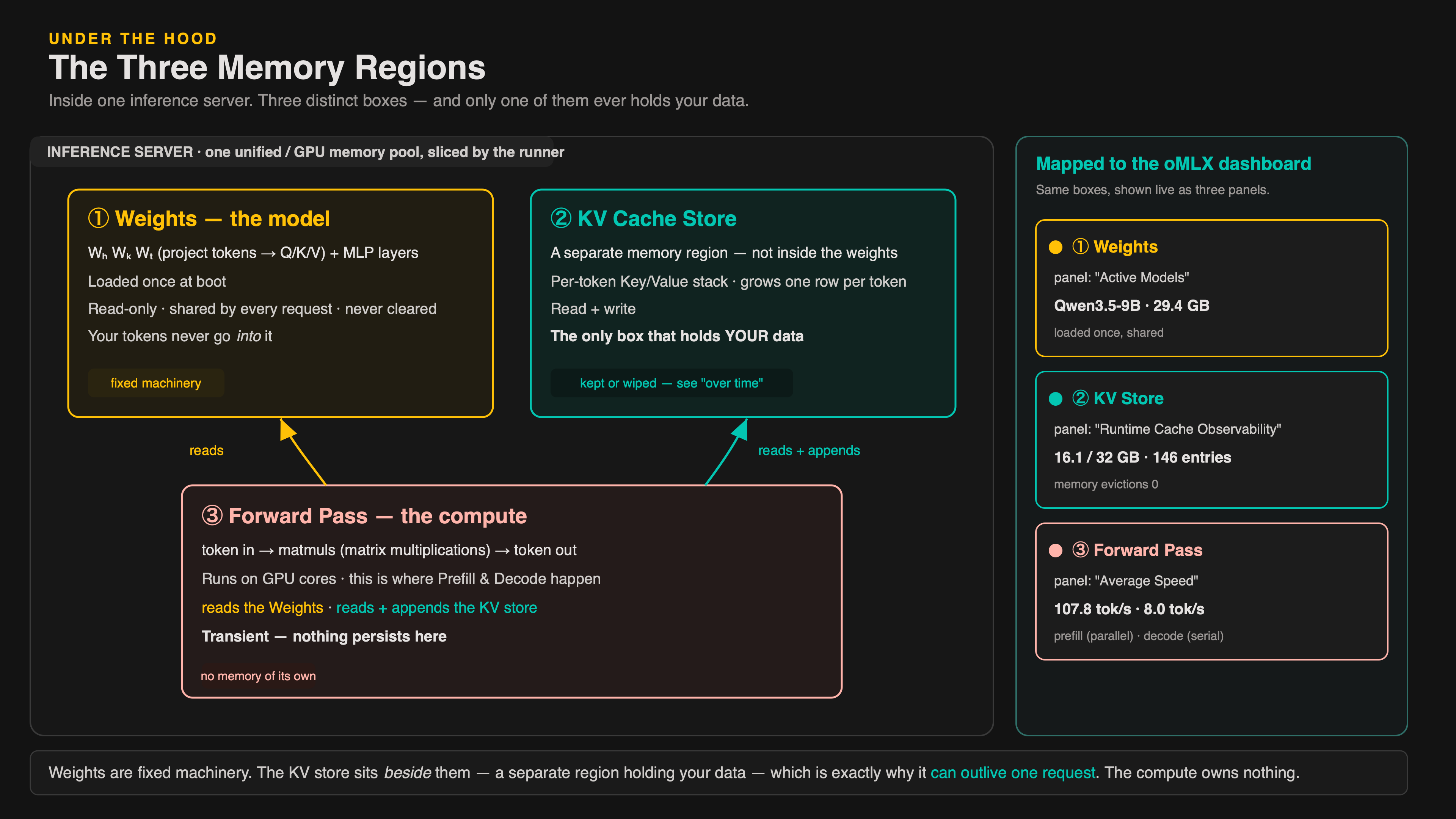
Where the KV Cache Lives
The cache is not inside the model’s weights. Inside the inference server there are three distinct regions — and your tokens’ K/V only ever land in one of them.
① Weights — the model
The weight matrices WQ, WK, WV and the MLP — loaded once at boot, shared by every request. Read-only. Never changed. Never cleared. Your tokens never go into them.
The machinery — fixed
② KV Cache Store (the “store” and the “cache” are the same thing — two words, one memory region)
A separate memory region holding the per-token K/V stack. Read + write. Grows one row per token. The only region that holds your data.
The prep table — fills up, kept or wiped
③ Forward Pass — the compute
Token in → matmuls → token out. Reads the weights and reads + appends the KV store. Transient — nothing persists here.
At the end of a response the runtime frees region ② by default — region ① is untouched, ready for the next request. So the only thing worth keeping alive is the KV store.(At scale, region ② can be offloaded to other memory tiers or nodes.)
→Weights = fixed machinery. KV cache = a separate store beside it, never part of the model — which is exactly why it can outlive one request.
Under the Hood · The Boxes, Live21G2
The Boxes, Live in oMLX
The three boxes aren’t an abstraction — the inference server exposes each one as its own panel. Same oMLX dashboard running Qwen locally on a Mac Mini. Each panel is one box.
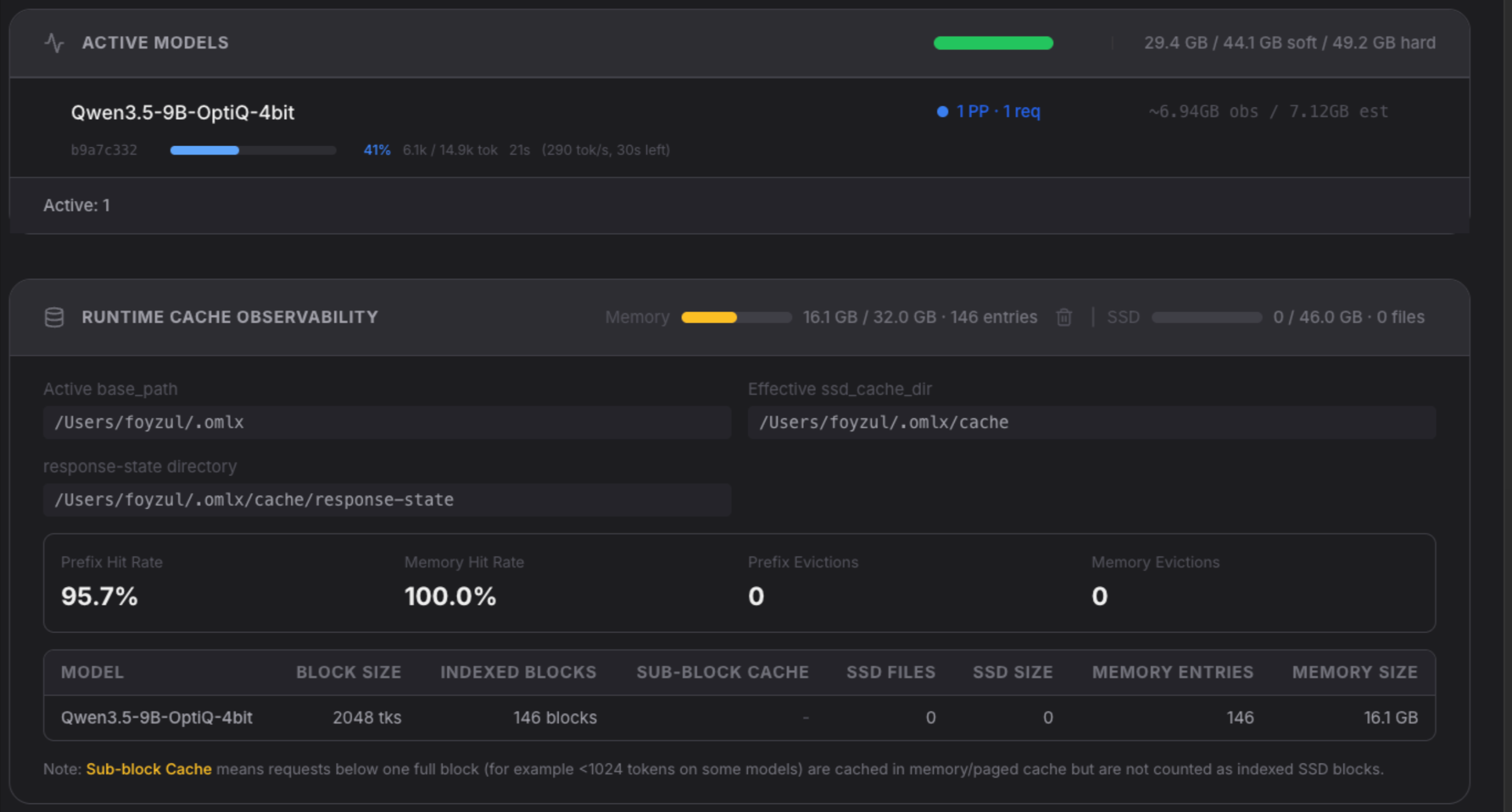
① Weights → “Active Models”
Qwen3.5-9B-OptiQ-4bit ~7.12 GB est· panel total 29.4 GB
② KV Store → “Runtime Cache”
Memory 16.1 / 32 GB 146 entries · 0 evictions
③ Forward Pass → “Working Buffers”
Activations + workspace ~6 GB — the gap between 7.12 GB weights and 29.4 GB total
→One unified memory, oMLX hands out slices: ~7 GB weights, ~6 GB forward-pass buffers, your KV in another — the dashboard tracks all three.
Under the Hood21G3
Demo
Live walkthrough — oMLX inference server running Gemma-4, watching the three memory boxes in real time.
Under the Hood · What Caching Skips21H0
What Caching Actually Skips
Back to the three stages from 21E1. Two of them get confused — and only one is ever cached. The trap: thinking “tokens are already computed, so what’s left to cache?”
① Tokenize
text → token IDs ”The cat” → [464, 2415]
Always runs · ~free · CPU
→
② Prefill — compute K/V
each token ID → vector → WK/WV matmul → its Key + Value
Expensive · GPU · the forward pass
→
③ Decode
emit output tokens one at a time, reading the whole K/V store
Serial · output cost
The confusion
A token’s K and V are produced by the forward pass (stage ②) — they don’t exist after tokenizing. So “tokens are already computed” only means stage ①. The expensive K/V work hasn’t happened yet.
Where caching enters
Hash the prefix token IDs → look in the store. Hit → load stored K/V, skip stage ② for them. Miss → run stage ② and store it. Stage ① still runs either way.
→Caching never skips tokenization. It skips the forward-pass K/V computation for the unchanged prefix — the only part that was ever expensive.
Under the Hood · The Solution21H1
Prompt Caching: Same Store, Kept Warm
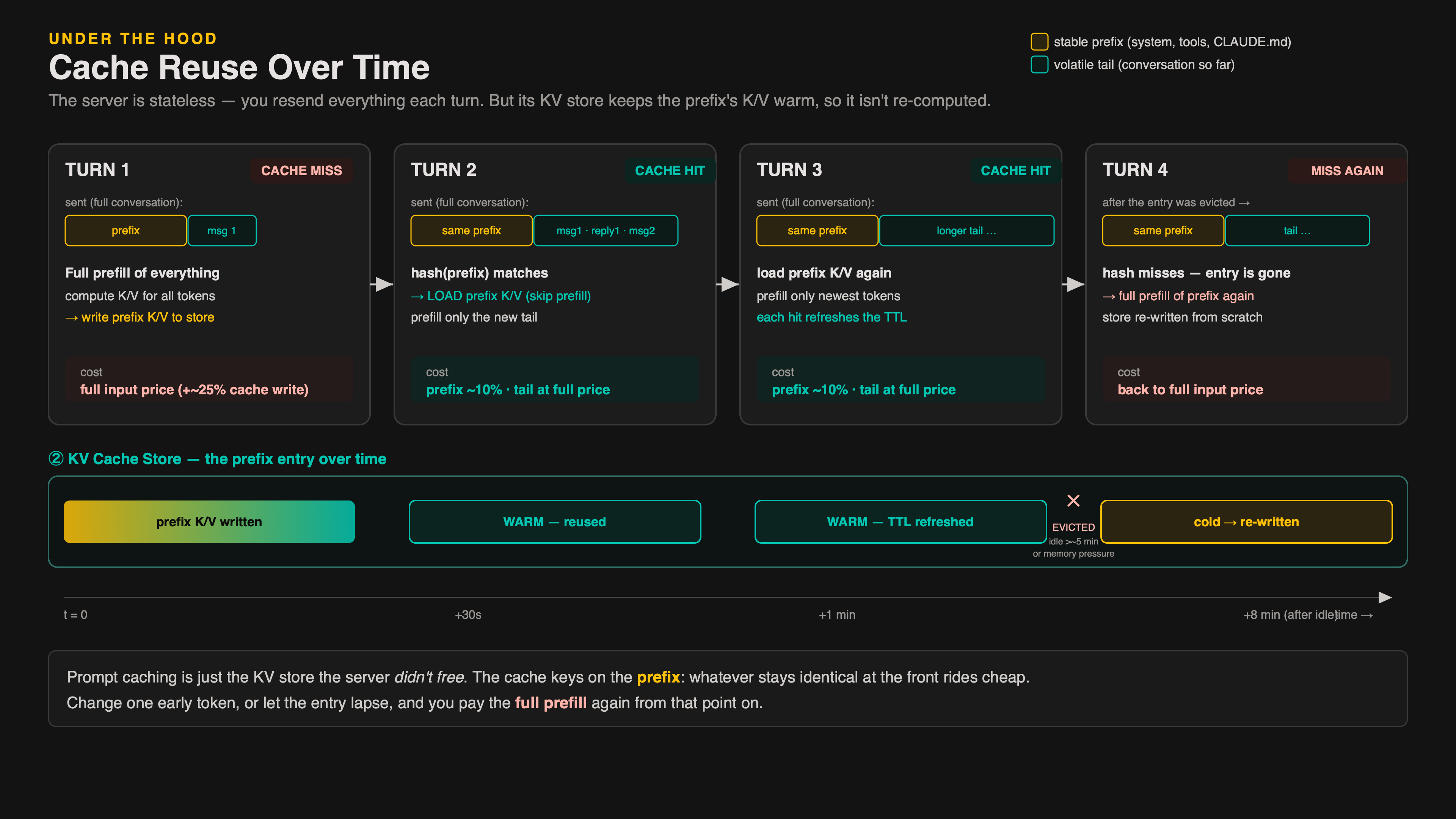
Solution 2 Prompt caching is the same KV store — the server just chooses not to free it. It keeps the prefix’s K/V alive across requests, so the next turn loads them instead of re-prefilling. You still send everything every turn; the server stays stateless.
Request 1 — cache write
Full prefill of the prefix — system prompt, tools, CLAUDE.md. Its K/V is computed and kept in the store, keyed by a hash of the prefix tokens.
Write ≈ 1.25× input price · once
Request 2 — cache hit
Same prefix → hash matches → load the stored K/V, skip its prefill. Only the new tail is prefilled. The match runs token-by-token until your context diverges.
Read ≈ 10% input price · every hit
Same store, two lifetimes
Within a response: built during prefill + decode, freed when it returns. Across requests: the prefix’s K/V is retained. Prompt caching is the KV cache the server didn’t throw away.
TTL · until evicted
Entries leave two ways: TTL expiry — the entry times out after ~5 min idle (refreshed on each hit) — or memory-pressure eviction — the server runs out of room and drops older entries to make space. Let it lapse → re-prefill at full cost.
→Caching keys on the prefix. Whatever stays identical at the front rides cheap. Change something early — even one token — and the cache breaks from that point on.
Under the Hood · Stable vs Volatile21I
What Is Your Stable Prefix?
Prompt caching works because your context has a predictable structure. The front never changes; only the tail does — and knowing this changes where you should write your instructions.
Stable Prefix · Cached after turn 1
System promptMachinery
Tool definitionsMachinery
CLAUDE.mdMachinery
Skills metadataMachinery
Identical every request. Cached after turn 1. ~10% of input price from turn 2 onward.
Volatile Tail · Billed every turn
Files read this sessionSession
Conversation so farSession
← your new messageYou
Changes every turn. Not cached. Full input price every turn.
CLAUDE.md is stable — cached, cheap from turn 2 on. Instructions you give in chat land in the volatile tail: full price every turn, and one edit to early chat breaks the cache from that point on.
→Write rules in CLAUDE.md. Tell session-specific context in chat. CLAUDE.md rides cheap. Chat is volatile.
Under the Hood · Live Demo21J
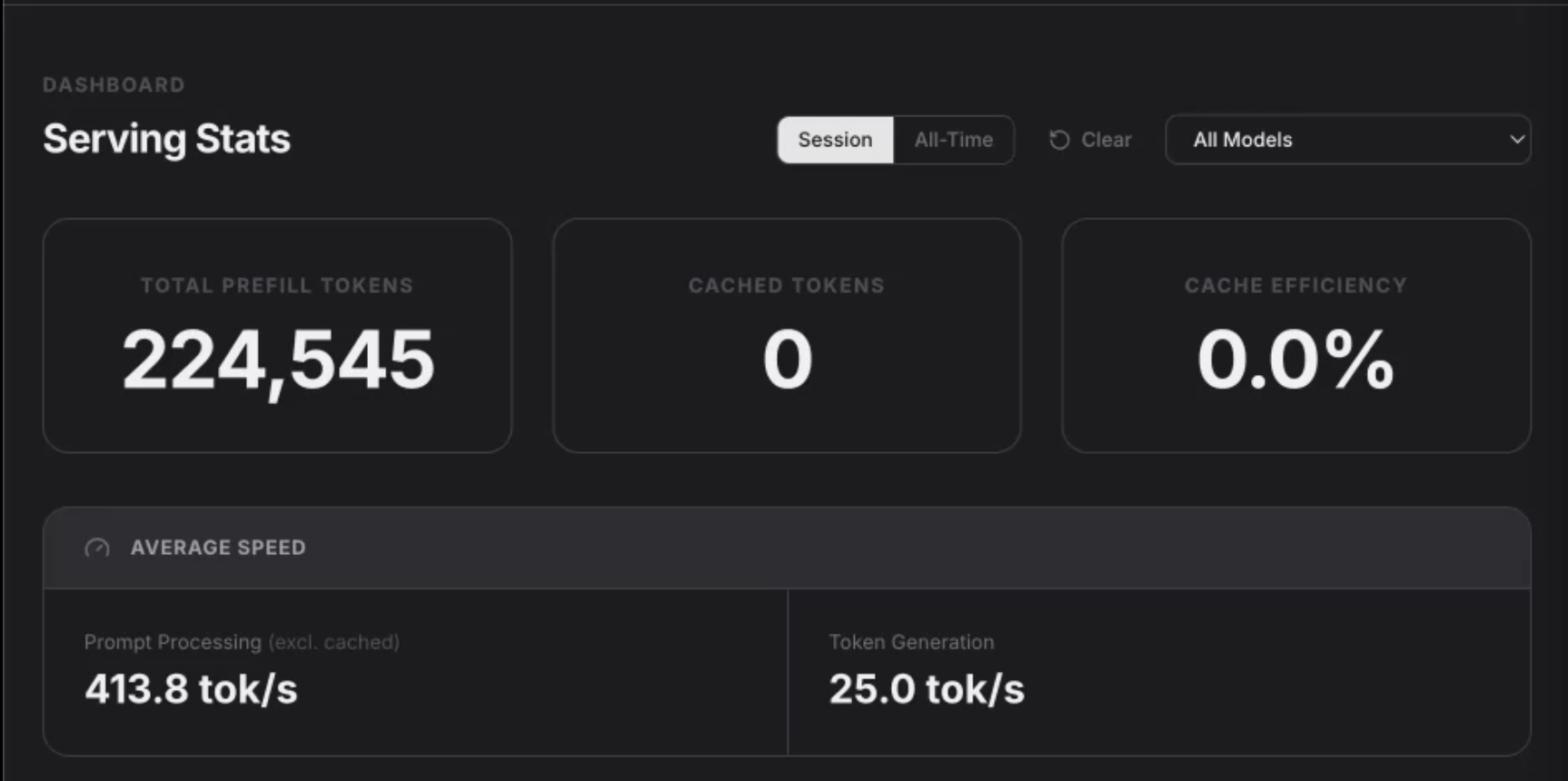
Live: Without Cache
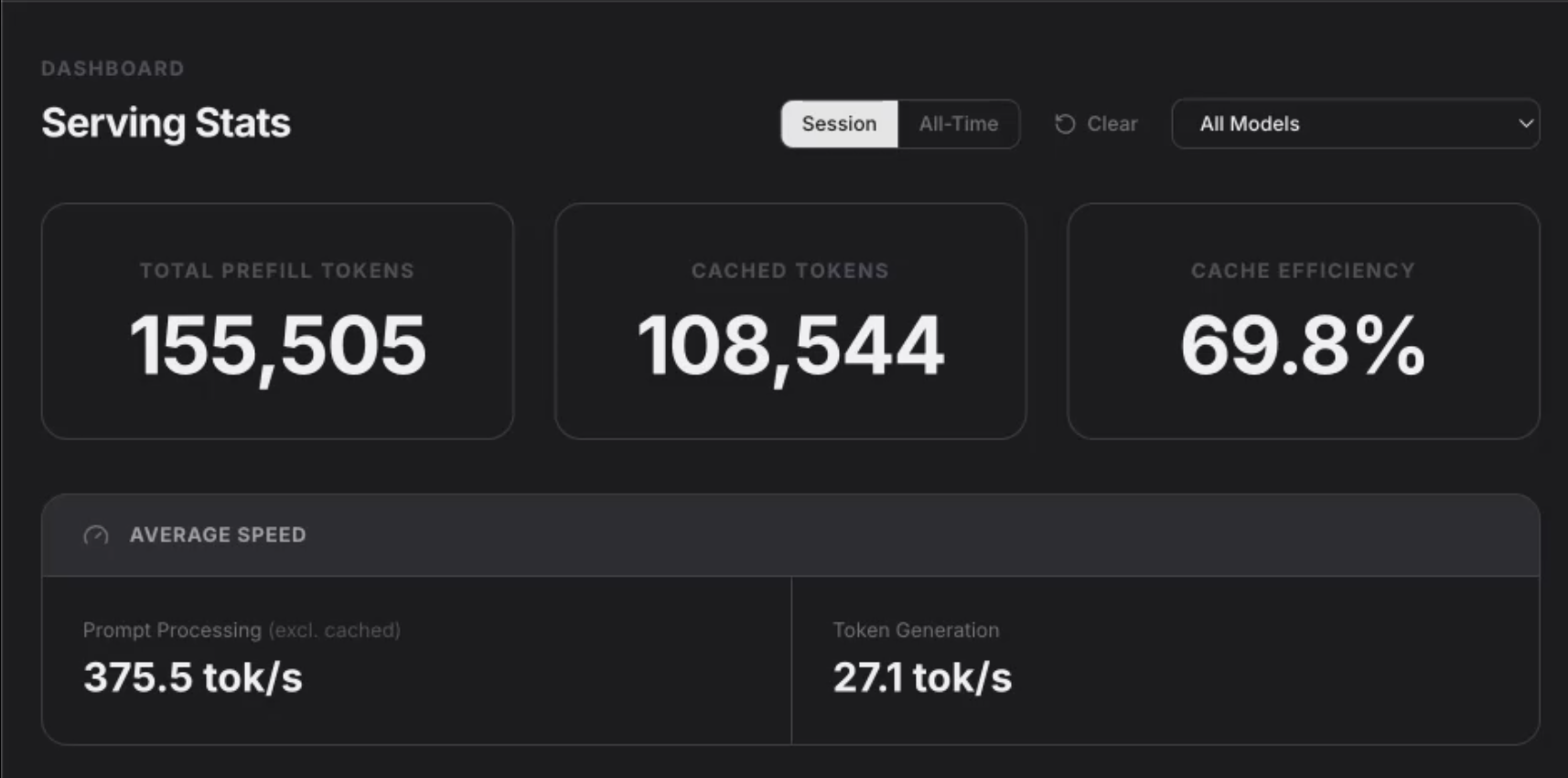
I ran the same prompt through Claude Code with cache disabled. Left: oMLX shows the serving mechanics. Right: Claude Code shows what you pay. Every turn recomputed from scratch.
→Same task — 3.3× faster, 3.7× cheaper. The prefix stayed warm; only the new tail needed compute.
Under the Hood · Working Habits21K
Spend Fewer Tokens, Do More
Everything so far was the machine. Here’s how you work it without bleeding tokens — habits that fall straight out of how context and caching actually behave.
01
Stable first, volatile last
Keep unchanging context at the front; let only the tail change. Editing early context mid-session invalidates the cache from that point on.
← N-21H1: prompt caching
02
Don’t pre-load “just in case”
Every token is re-sent and re-billed every turn. Dumping whole files up front costs you on all subsequent turns. Let the agent read on demand.
← N-21C statelessness + N-21E growing loop
03
Keep the window lean
A focused session with a small, relevant window beats a sprawling one — both for cost and for quality. Relevance degrades as the window fills.
← N-21B: finite budget
04
Mind Bengali weight
Bengali tokenizes heavier than English. Long Bengali prompts cost more tokens than they look — tighten them when it matters.
← N-21A: token costs
→Stable context, focused sessions, deliberate tools. Spend fewer tokens by making every token earn its place.
Agentic Software Engineering: Foundations
Foundation complete
Use the speed. Understand the machine. Keep the discipline.
You now have the framework, the Claude Code surface, the skill patterns, and the systems model needed to work with agents deliberately.