Agentic session efficiency: the DOs and DON'Ts
I ran the session-audit skill over my own AI coding sessions — 854 Claude Code sessions, then a four-run trend series, then 194 kimi-code sessions — and let it rank where the money was going. This is the merged rulebook that came out the other side.
Tool: session-audit (https://github.com/foyzulkarim/skills/tree/master/dev-pipeline/skills/session-audit) skill — Audit Claude Code session logs for token waste and produce a ranked, attributed efficiency report (habit / skill_file / config).
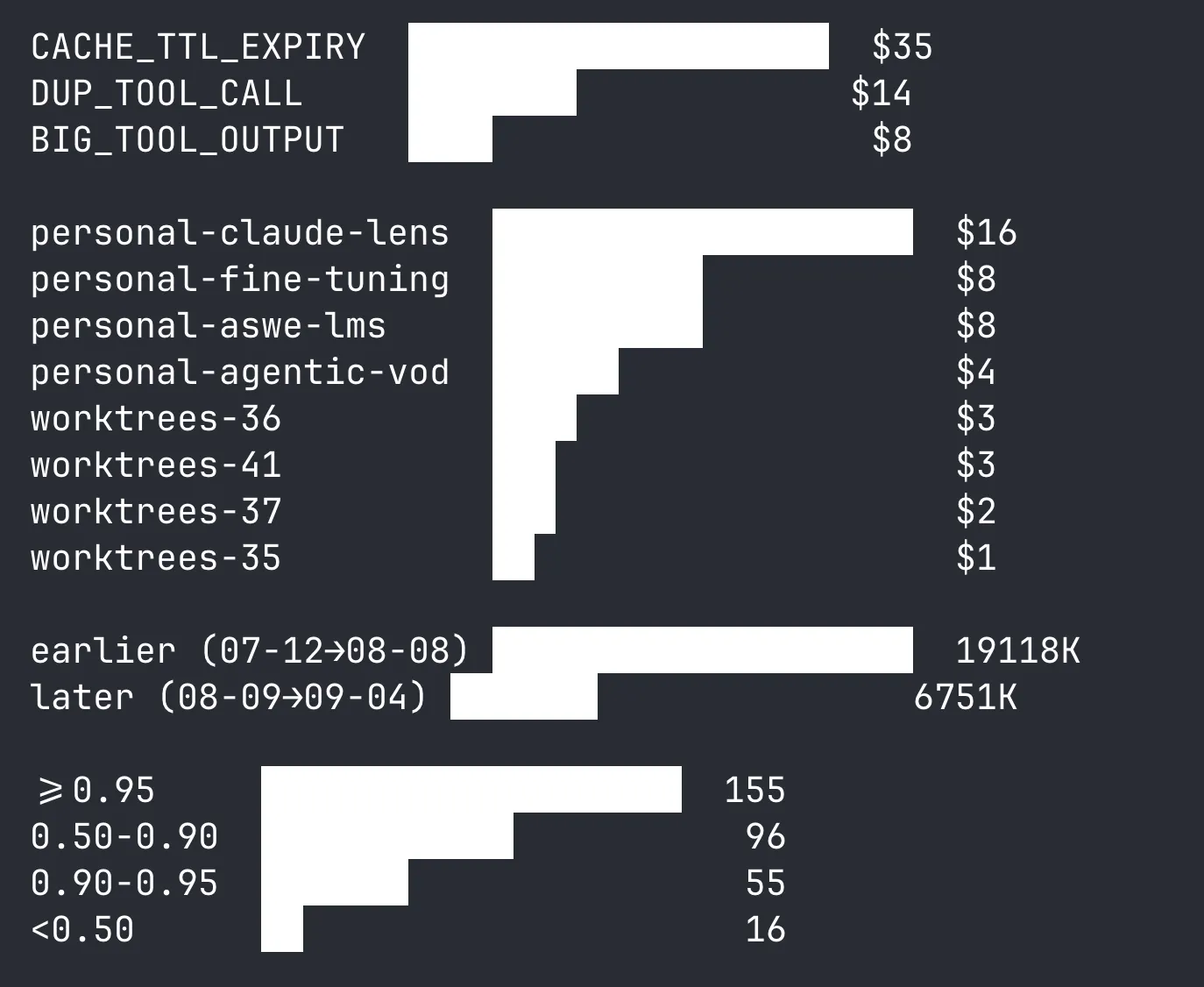
See the full audit report → (854 sessions, 916 findings, ranked fixes).
The lesson
The principle: audit your own sessions, apply the fix where it can enforce itself, and re-audit.
Tokens spent re-doing work the agent already did are pure waste — they consume context and budget without adding new information. The audits parse session transcripts and produce a ranked report: waste mechanism, affected sessions, token and dollar cost, and a concrete fix for each. Across the four-run trend series the waste rate fell 0.69% → 0.66% → 0.46% → 0.42% of read volume — but only for the fixes I actually applied.
What follows is the curated set I felt most from my own sessions — the rules that moved the trend line. Everything else from the audits, deduplicated and grouped by theme, lives in Others below. Every number is real, from a named audit run.
The DOs
Delegate scanning to subagents
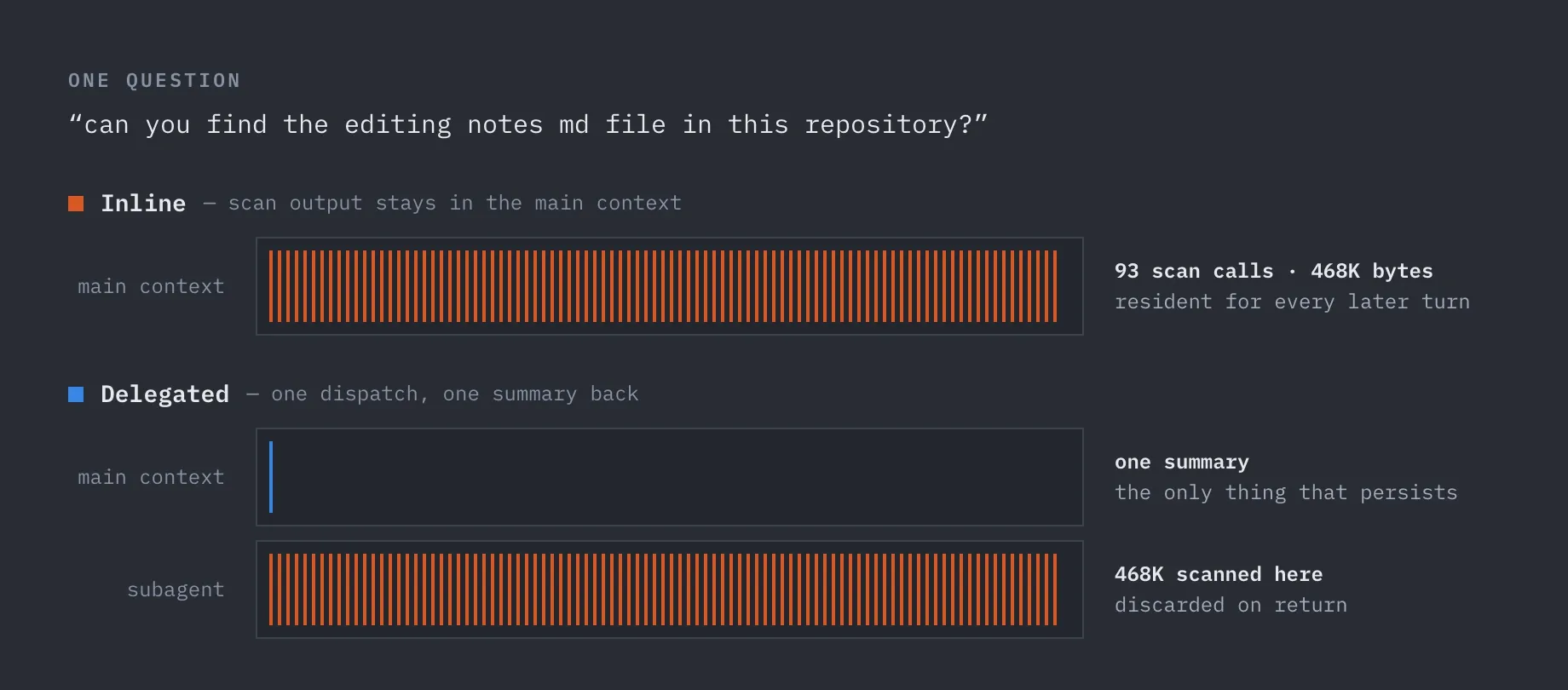
Scan output stays in your main context for the rest of the session. Sessions that never delegated averaged $73 across the corpus. The worst case ran 93 inline scan calls just to answer “can you find the editing notes md file in this repository?” — a one-line “find this file” question that’s exactly the kind of task you’d hand off to a subagent, except this session never used one.
- Dispatch an Explore subagent for any “find X” / “where is Y” question, and for any scan-heavy phase once the inline scan count passes ~15. Subagent bytes never persist in your main context. In the 854-session audit, only 6.3% of sessions used a subagent at all.
- Open marathon sessions with a subagent summary instead of inlining three large spec docs at turn 1. Those docs ride your context prefix for all 284 remaining turns.
Manage the session lifecycle
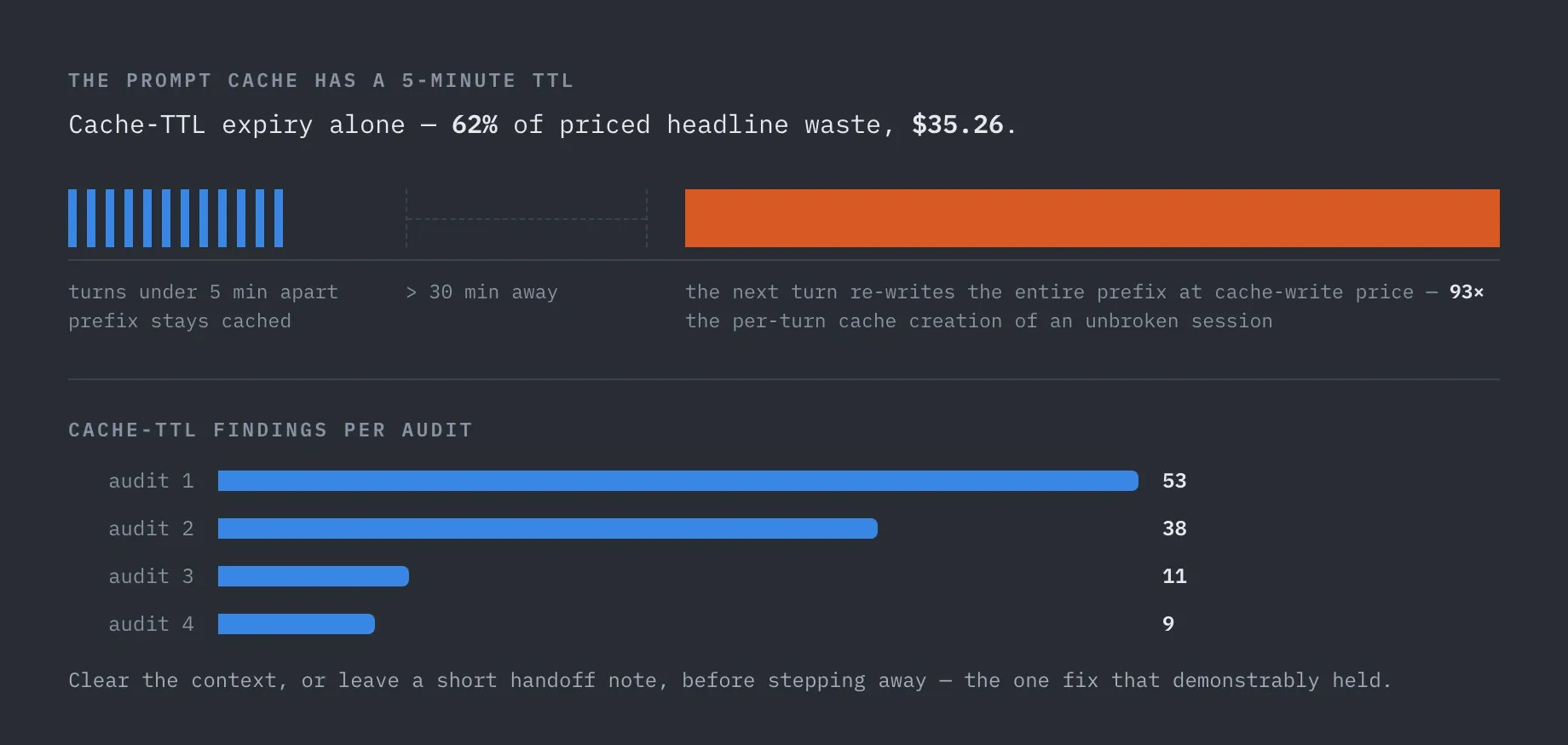
The prompt cache has a 5-minute TTL. Cache-TTL expiry alone was 62% of priced headline waste ($35.26); resuming after a >30 min break costs 93× the per-turn cache creation of an unbroken session.
- Clear the context (or write a short handoff note) before stepping away. This fix demonstrably worked: TTL findings fell 53 → 38 → 11 → 9 across the four audits.
- Clear between unrelated work units. Appending “one more thing” to a long-running session inflates every subsequent turn’s cost.
Convert your workflow into skills and scripts
Verbal reminders only work while you remember to give them. The same rule written into a skill file fires on every run, regardless of whether you remember.
- Bake rules into your skill files and agent config, which load on every invocation. A one-line skill edit makes the rule fire on every run, even when you forget to remind the agent. A verbal reminder fades within days.
- Move a skill’s mechanical steps into bundled scripts. A script runs deterministically at zero context cost; the same logic written as prose instructions gets re-read, re-derived, and re-typed at full price every single run. Keep the skill file as the thin “when and how to call it” layer.
- Document the script’s usage in the skill file itself. If the agent has to explore your skill to use your skill, you’re paying context price for documentation you could have written once.
The DON’Ts
Don’t re-read files
Tokens spent re-doing work the agent already did are pure waste — they consume context and budget without adding new information. Re-reading was the single largest such category in every audit: 72% of total waste in kimi-code, ~68% in the trend series, 83% of DUP waste in the big Claude Code run.
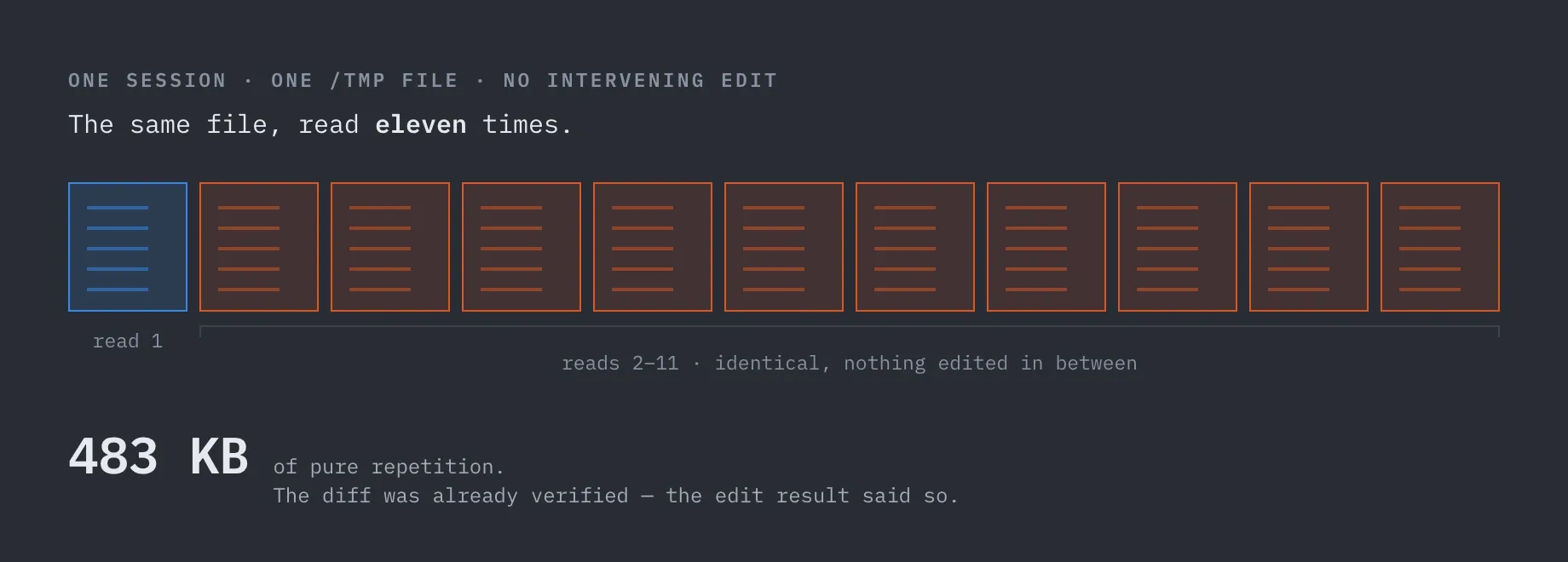
- Don’t re-read a file you already read, with no intervening edit. The champion: one session
read the same
/tmpfile eleven times — 483 KB of pure repetition. Trust your edit results; the diff was already verified. - Don’t whole-read spec files when you need one section. Reads accounted for 97–99.7% of oversized-tool-output waste.
Don’t fight the session lifecycle
Resuming a big session after a >30 min break re-pays the entire prefix at cache-write prices. Worst single session: $6.28 in cache-TTL findings alone.
- Don’t resume a session after a >30 minute break. Start fresh, or hand off with a short note instead.
- Don’t paste screenshots one at a time in serial Q&A. Each image invalidates the cached prefix — one 12-turn session hit a 0.34 cache hit ratio where healthy is ~0.98. Batch related images into one message.
Don’t rely on discipline alone
A 15-minute, three-file skill edit was recommended four times across audits and never applied, while remaining ~68% of measured waste.
- Don’t declare a habit “fixed” from a short window. One report called browser-duplicate waste fixed based on 2 sessions; the next audit, with a fuller window, showed 393K of recurrence.
- Don’t ship a script inside a skill without its usage reference — every session will re-learn the tool’s own command surface before doing any work.
- Don’t panic about large context peaks. Prefixes over 200K carried zero direct waste on long-context models. Big contexts aren’t the bug — they’re the amplifier that makes the habits above expensive.
Don’t misread the data
Audit buckets measure different things — adding them together is a category error.
- Don’t add the no-delegation bucket to the others. It prices what would have happened with delegation; the others price read and duplicate waste. They measure different things.
- Don’t trust a project’s aggregate cache hit ratio without per-session waste alongside. Bad cache state shows up in per-session waste first.
- Don’t run the audit on sessions < ~5 turns. Too short to register meaningful cache state.
- Don’t read trends into a single run. Wait for archived baselines before calling a rate change verified.
Others
The remaining rules from the audits. Useful context, but not the levers that moved my own trend line.
Bound your tool output
Tools return their full output into your context by default. Oversized reads were 13% of headline
waste ($7.58 / 5,279K tokens), with Read alone responsible for 97–99.7% of that bucket.
- Bound
GrepandGlobcalls with a head limit. Most scans only need 20–50 matches; without a limit the full result lands in your context window and rides it for the rest of the session. - Read with offset and limit on multi-KB files — especially spec files. Read the section you’re working on, not the whole document. The worst single finding was a 94 KB read where 64 KB was excess.
- Pipe shell output through
head,tail, orwc -lwhen the raw output could exceed a few KB.git status,git log,ls -R, andfindare routine offenders. - Prefer
ReadoverBash catfor known files.
Don’t scan inline
The biggest savings comes from “delegate the phase,” not from “read less.” 93 scan calls cost 468K scan bytes for what should have been one subagent dispatch.
- Don’t loop shell + read + grep inline across many targets. If the scan list gets wide, the whole phase belongs to a subagent.
Measure in dollars, not tokens
The token and dollar rankings disagreed in my data — the biggest waste isn’t always the most expensive waste.
- Rank waste in dollars, not tokens. One project wasted 1.6× the tokens of another but cost about the same, because it ran at a lower model rate. Fix where the money is.
- Track per-session waste outliers, and flag any project crossing ~$0.20/session.
- Switch models mid-session for mechanical work — diff paging, test loops, browser verification cost 5× on a premium-rate session for the same tokens.
- Re-audit and track trend lines. The audit tells you which fixes actually stuck — and which recommendations you quietly ignored.
Don’t abuse the tools
Retries burn bandwidth, and click-screenshot-click flows don’t compose into skills.
- Don’t retry the same read 3+ times on a path that doesn’t resolve. After two failures, re-derive the path. Another identical retry is just logging noise.
- Don’t drive the browser turn-by-turn by hand. “Click… screenshot… click… screenshot” sessions were the worst offenders until the flow was compressed into a skill. If you do a flow twice, make it a skill.
Batch browser automation
Browser QA output (screenshots, page captures) is bandwidth-heavy. 41 duplicate screenshots in one session cost 547K tokens.
- Batch browser automation: 2–3 UI actions per snapshot, one capture per verified step, and check console and network logs before re-capturing the whole page.
Know your harness
One caveat before you apply the cache rules universally: they’re harness-specific.
Claude Code reports real cache statistics, so cache-TTL expiry is detectable and was its biggest bucket. kimi-code reports zero cache creation corpus-wide, so the cache rules simply cannot fire there — don’t optimize for cache behavior on a harness that doesn’t meter it. Optimize for fewer total bytes instead: bounded tools, no re-reads, delegation. Those transfer everywhere.
Close
Most of what the audits caught fits in a skill file — and the skill file wins, because it loads on every run. The rest is small: clear after long breaks, dispatch a subagent when the scan list gets wide, never re-read a file you already have, bound tool output, measure in dollars not tokens. Audit your own sessions, apply the fix where it can enforce itself, and re-audit. The next report tells you which rules stuck and which ones you quietly ignored.